GoHighLevel Founder Plan Explained: $497, Free AI and Every Feature
The HighLevel Founder plan is the $497-a-month top tier, formerly Agency Pro. As of November 17, 2026, it includes everything in Unlimited plus SaaS mode, rebilling with markup, advanced API, Founder-only tools like Meeting Rooms and project management, the highest free AI limits for your team, and a $20 AI Employee Starter tier for clients.

Disclosure: I earn a commission if you start HighLevel through my links. It costs you nothing extra and doesn't change what I recommend. How this site makes money.
On this page 16 sections
The Founder plan is HighLevel’s $497 tier with a new name and a much longer feature list. The part most people skim past is the AI. HighLevel’s own Founder page sells it as the plan with “The Most Free AI,” and that’s where a lot of the real value now sits.
I read every price and limit below on HighLevel’s pricing page, Founder page, help center and changelog on November 17, 2026. Where HighLevel hasn’t published a number, I say so instead of guessing.
I also recorded a walkthrough of the new Founder plan, including why I wouldn’t buy it until you’ve checked what’s actually included.
What is the HighLevel Founder plan?
The Founder plan is HighLevel’s top self-serve plan at $497 a month. It’s the renamed Agency Pro plan, which a lot of people also called SaaS Pro. HighLevel’s Founder plan help article calls it “the new name for the $497/month Agency Pro Plan,” with everything from the $97 and $297 plans plus new tools.
HighLevel announced it at LevelUp 2026. Its launch post from November 7, 2026 says the plan “completely replaces the $497 Agency Pro tier.” If you were already on $497, you didn’t have to do anything. HighLevel says you were moved over automatically and get new features in stages.
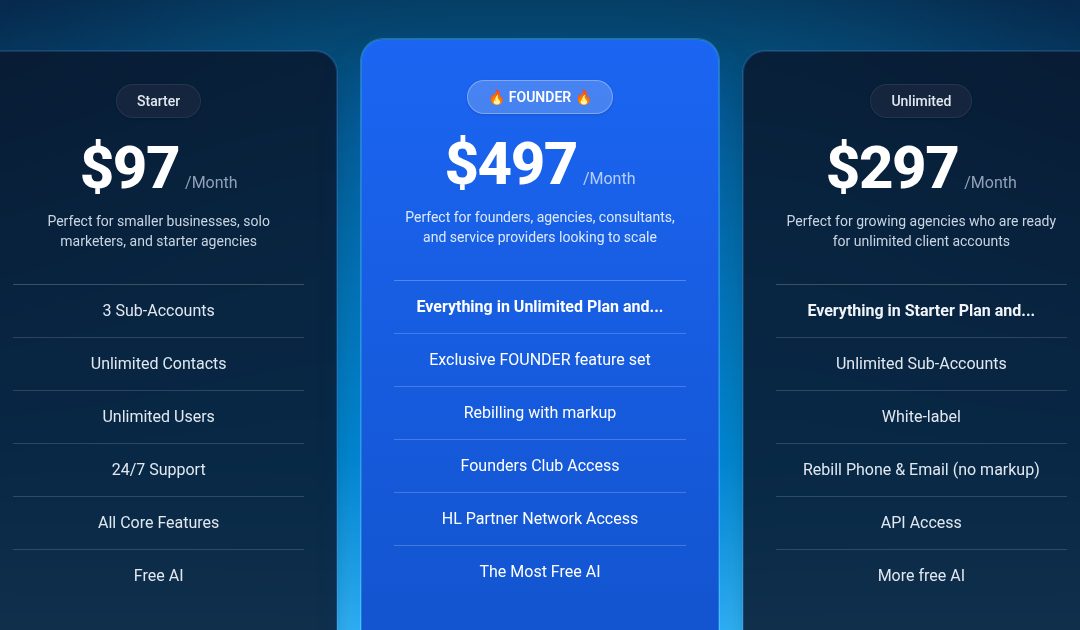
Three things changed with the rename, and they’re why I rebuilt this guide:
- A bigger exclusive feature set. Meeting Rooms, Events, project management, ticketing, Workflow Maps, custom navigation, HighLevel Industries and an A2P Console joined SaaS mode and rebilling with markup.
- Free AI. HighLevel made its builder AI free for agency users on every plan, and gave the $497 plan the highest limits and the best models.
- Founder-only perks. These include the Partner Network, AdFuel local ads, payment commissions and the Founders Club. Most are still rolling out.
How much does the Founder plan cost?
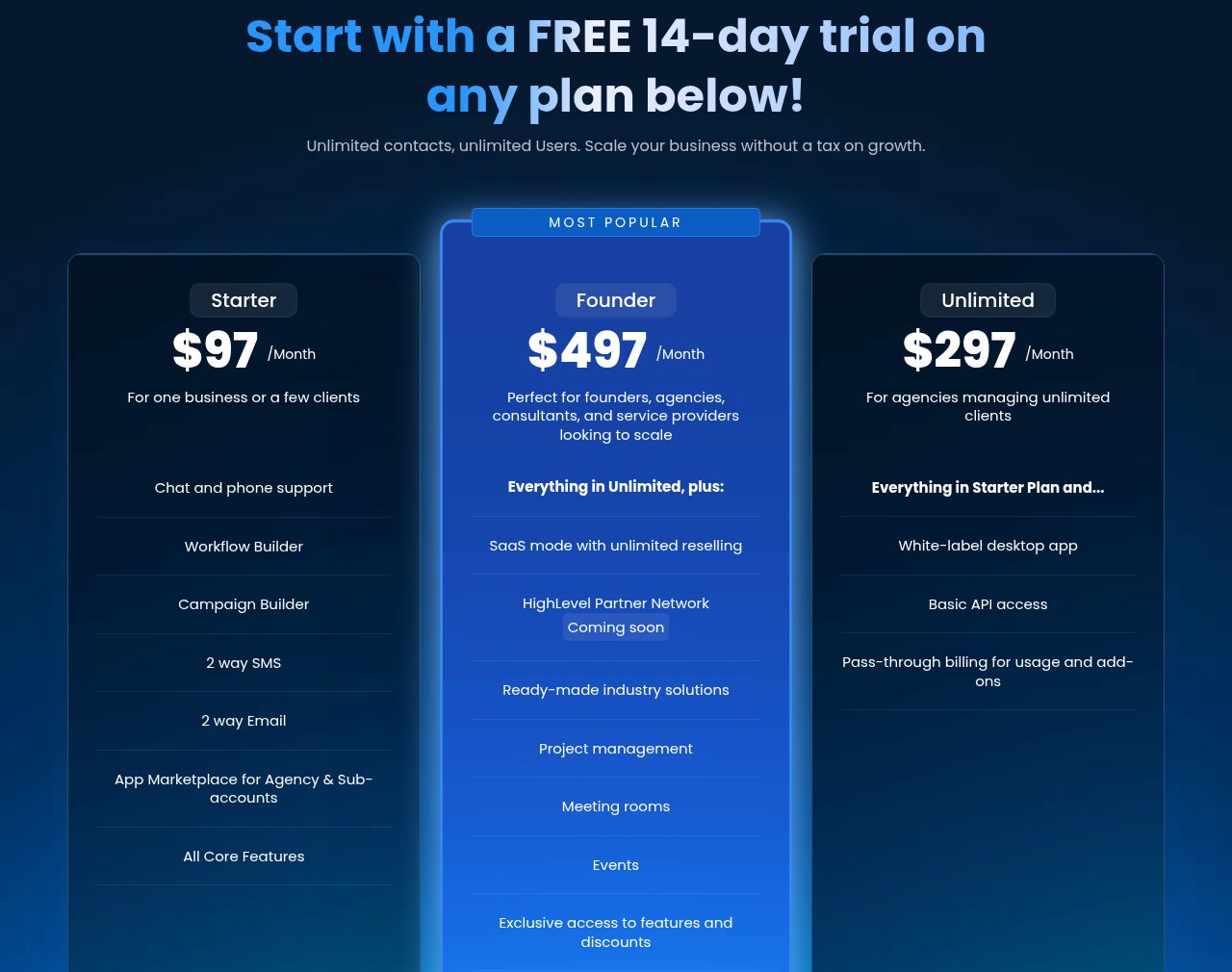
The Founder plan costs $497 a month, the same as Agency Pro did. Billed yearly, HighLevel’s in-app upgrade screen shows $4,970 a year, or about $414 a month. There’s no long-term contract, and usage such as texts, calls, email and paid AI is billed on top through your wallet.
Here’s how all three plans price out, as of November 17, 2026:
| Plan | Monthly | Annual | Effective monthly on annual |
|---|---|---|---|
| Starter | $97 | $970 | $81 |
| Unlimited | $297 | $2,970 | $248 |
| Founder | $497 | $4,970 | $414 |
Monthly prices come from the pricing page. Annual prices come from the in-app upgrade screen in HighLevel’s Founder plan help article, and HighLevel’s email re-billing article is titled with the same “Founder $497/$4970” pairing:
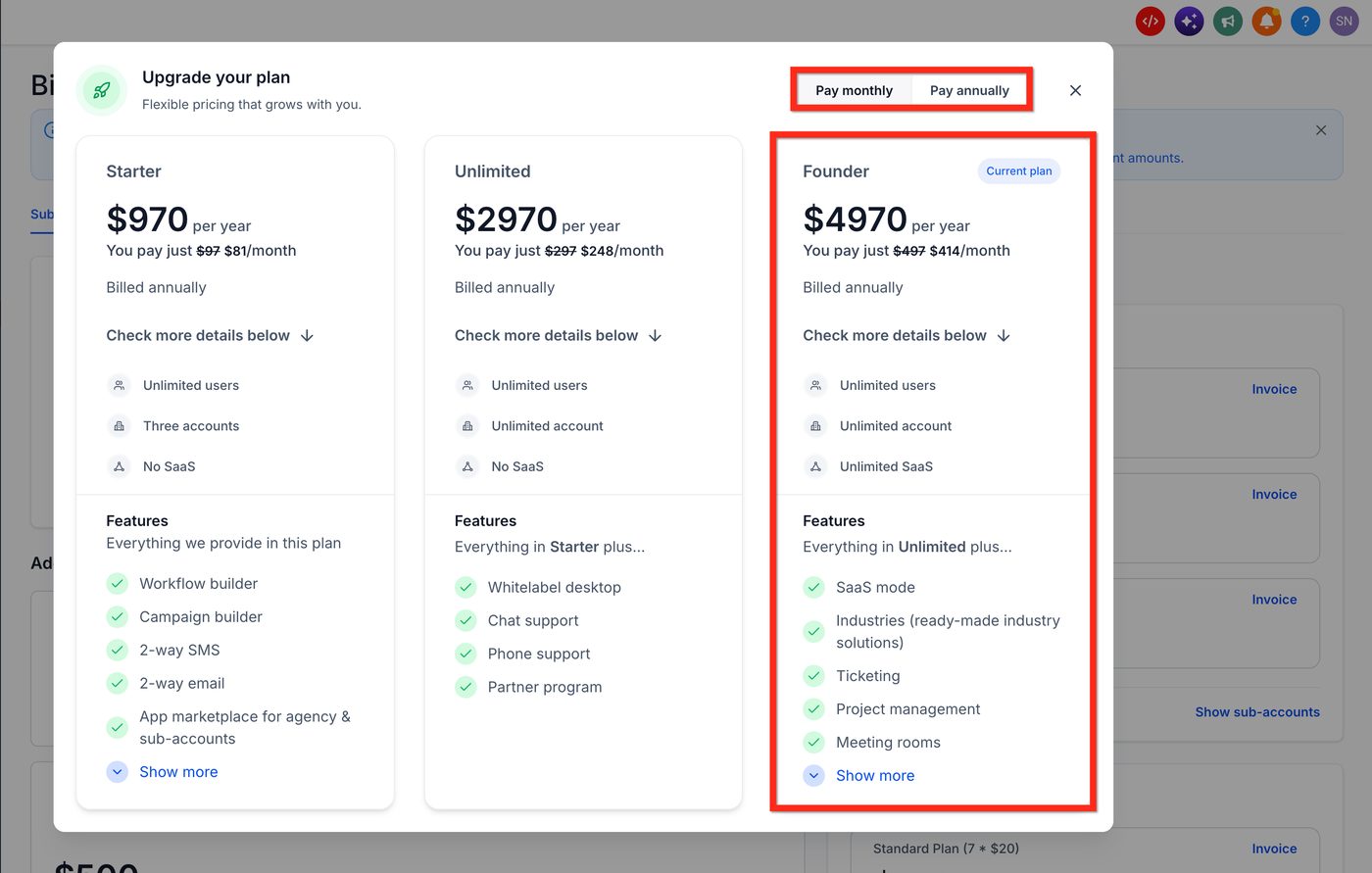
Annual billing saves $994 a year compared with paying $497 monthly (12 × $497 = $5,964). That’s real money, but only lock in a year once you know you’ll use the Founder-only features.
What’s included in the Founder plan?
The Founder plan includes everything in Unlimited, which already has unlimited sub-accounts, the white-label desktop app and rebilling at cost. On top of that it adds about a dozen exclusive tools and a set of perks.
Here’s every one, with what it does in plain English, from the launch post and the Founder page:
| Feature | What it does | Status (Nov 2026) |
|---|---|---|
| SaaS mode | Sell your own plans; HighLevel creates the client account, sets permissions and bills automatically | Live |
| Rebilling with markup | Charge clients more than cost for texts, calls, email, email validation and AI, and keep the margin | Live |
| Advanced API access | Full API access for custom integrations (Unlimited has basic API) | Live |
| A2P Console | One place to manage US texting (A2P 10DLC) registration across all client accounts | Live |
| AI Employee rebilling and allowances | Highest free AI limits for your team, plus the $20 AI Employee Starter plan for clients | Live |
| Project management | Tasks, boards, owners and due dates inside the CRM | Labs |
| Meeting Rooms | Built-in video calls with recordings, transcripts and AI summaries | Labs |
| Events | Sell tickets, take registrations and check people in by QR code | Labs |
| Workflow Maps | A bird’s-eye map of how your automations connect, for troubleshooting | Labs |
| Custom navs | Reorder and group the left-hand menu clients see | Labs |
| User Reports | Calls, messages, appointments and closed deals per team member | Listed |
| HighLevel Industries | Niche tools: reservations, menus and orders for restaurants; jobs and routing for home services; coaching | Private beta |
| Ticketing | Turn support messages into tickets you can assign and track | Private beta |
| Loyalty and rewards | Loyalty programs for online and in-store purchases | Private beta |
| Custom Onboarding | Custom Launchpads that walk new clients through setup | Coming soon |
| Email Health Console | Deliverability, bounces and spam complaints across clients | Coming soon |
The status column comes from the labels on HighLevel’s Founder overview graphic (Live, Labs, Private Beta) and the “coming soon” tags on its launch post. User Reports appears in the launch post’s feature list without a status label. Advanced API and the AI Employee items aren’t labeled on the graphic either; I marked them live because HighLevel’s help center documents them as available now.
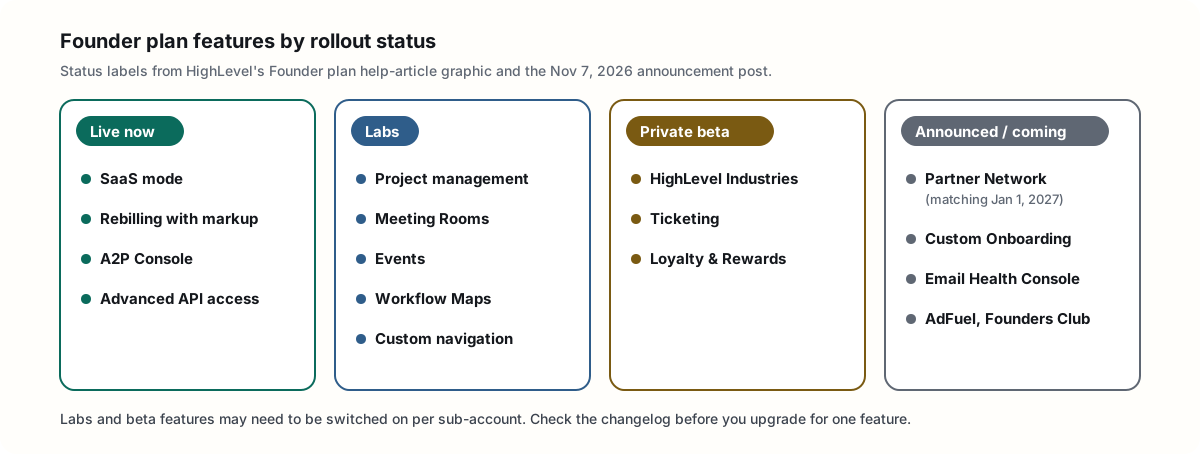
Two things are not Founder-only, even though people often assume they are:
- Unlimited sub-accounts. You already get them on the $297 plan.
- Free builder AI. Ask AI, AI Studio, Creator Studio and Content AI are free for agency users on all three plans. Founder gets the most of it, which I’ll get to next.
What is the “free AI” on the Founder plan?
Free AI is HighLevel’s builder AI, included at no extra cost for your agency team on every plan, subject to fair use. The Founder plan gets the highest limits and advanced models. It covers tools you use to build, like Ask AI, AI Studio, Creator Studio and Content AI. AI that runs a client’s business stays paid.
HighLevel explained it best on its LevelUp FAQ webinar. The team split AI into “build” and “run.” Build AI is free so you and your team can set up your own business and your clients’ accounts without running up a bill. Run AI, the stuff that answers calls and replies to leads, still costs money, and on Founder you can mark it up.
Here’s exactly what’s free and for whom, from HighLevel’s AI Product Pricing article on November 17, 2026:
| AI feature | Agency users ($97, $297, $497) | Client sub-account users |
|---|---|---|
| Ask AI | Free* | Paid (or via an AI Employee plan) |
| AI Studio | Free* | Paid (or via an AI Employee plan) |
| Creator Studio | Free* | Paid (or via an AI Employee plan) |
| Content AI | Free* | Paid (or via an AI Employee plan) |
| Funnel & Website AI, Email AI, Calendar AI, Layout AI | Free* | Free* |
| Knowledge Base, Workflow AI Builder | Free* | Free* |
| Conversation AI, Voice AI, Reviews AI, Managed Agents, Workflow AI actions | Paid | Paid |
*Subject to HighLevel’s fair-use limits.
So where does Founder pull ahead? HighLevel’s Comparing AI Access Across Plans article gives agency users “standard” limits on $97, “higher” limits on $297 and the “highest usage limits” on $497. On the webinar, HighLevel described the $497 plan’s allowance as “basically unlimited with a fair use policy.”
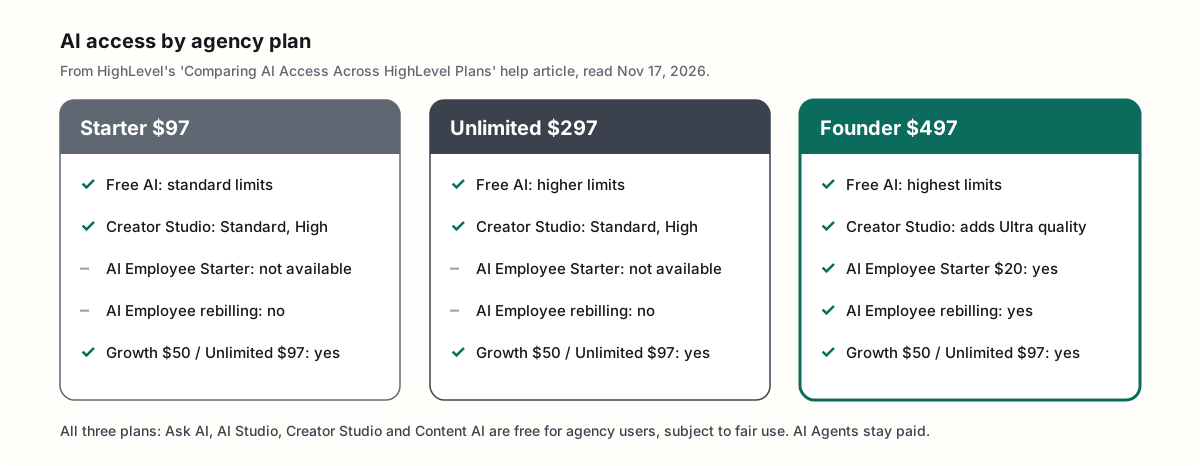
The Founder plan also gets three AI extras the other plans don’t:
- Advanced Creator Studio models. HighLevel’s Creator Studio pricing article lists Standard and High output quality for agency users on $97 and $297, and Standard, High and Ultra on $497.
- The $20 AI Employee Starter plan for client sub-accounts, which is “available exclusively to agencies subscribed to HighLevel’s $497 Founder plan.”
- AI Employee rebilling. HighLevel’s pricing guide says your agency needs the $497 plan to rebill AI Employee usage.
How do the Free AI limits work?
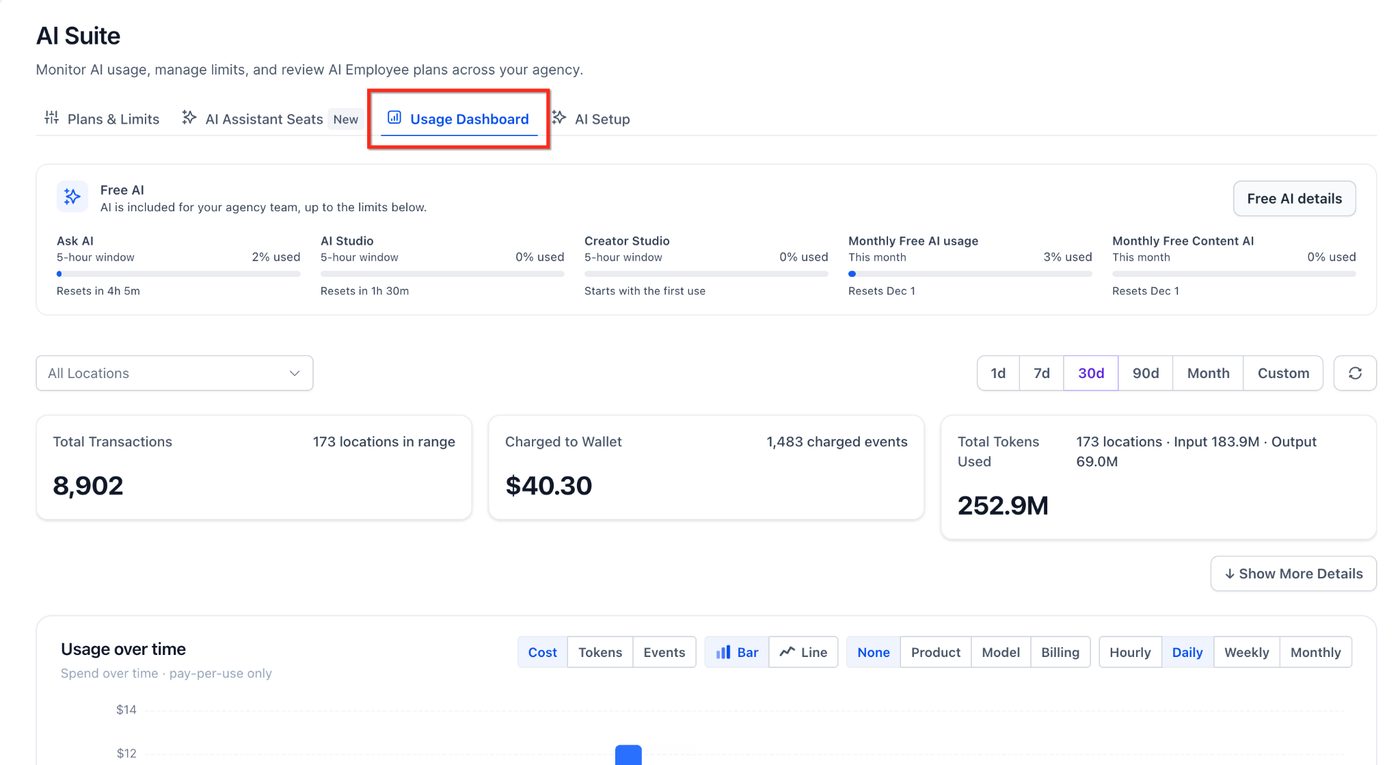
Free AI uses two layers of limits, both shared across your whole agency team. Each of Ask AI, AI Studio and Creator Studio has its own rolling 5-hour window. Those three plus Content AI also share one monthly limit that resets on the 1st at 00:00 UTC. That’s 7:00 PM Eastern on the last day of the month during standard time.
From HighLevel’s Free AI for Agency Users article:
- One shared allowance per agency. It isn’t split per user or per sub-account.
- Each 5-hour window starts with your first request in that product and resets five hours later. Unused usage doesn’t carry over.
- Alerts at 75% and 90% of the monthly limit, by email and in the app, and again when a limit runs out.
- It follows your team into client accounts. Agency admins and users can open any sub-account and build there for free.
- It can’t be resold. Free AI can’t be transferred or shared with sub-account users.
You can see all of it on the Free AI card in AI Suite:
What happens when you hit a Free AI limit?
Nothing gets charged automatically. If you hit a Free AI limit, AI pauses until the window or month resets. The exception is when you’re working inside a sub-account that has an AI Employee plan. Then usage draws from that plan’s allowance first.
If you’d rather keep working, an admin can turn on Extra Usage in AI Suite. It’s off by default. Usage past the limit is then billed at pay-per-use rates, and you can set a monthly cap so it stops at a number you choose.
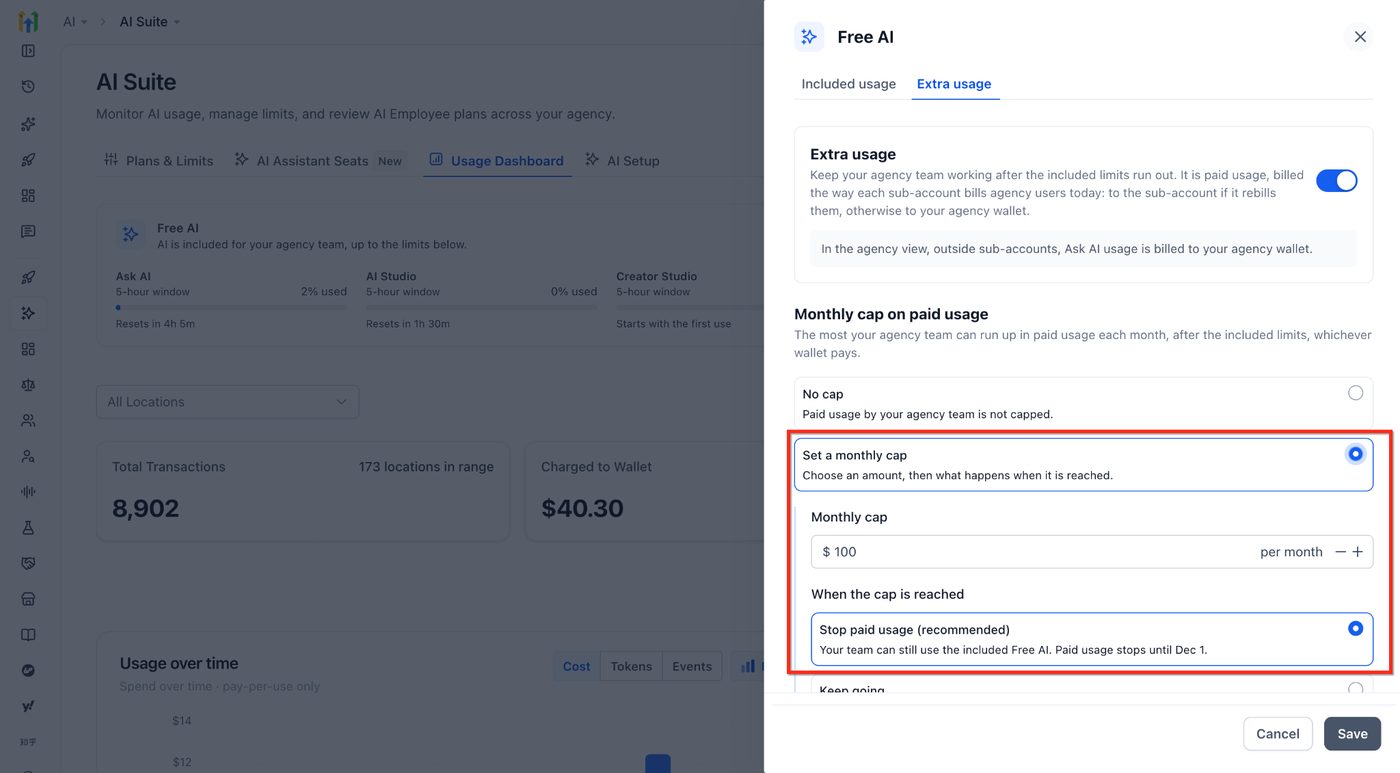
Some builder tools have no pay-per-use option at all, so they just pause at their limit: Funnel & Website AI, Email AI, Workflow AI Builder and Memberships AI. AI Studio hosting is also billed separately from the free generations. Nano hosting is free, and Micro and above cost extra.
What does the free AI not cover?
The free AI doesn’t cover anything that runs a client’s business on its own. Conversation AI, Voice AI, Reviews AI, Managed Agents and premium Workflow AI actions are paid on every plan, through an AI Employee plan or pay-per-use. Phone charges still apply to every call.
A few pay-per-use rates from HighLevel’s AI Product Pricing article, so you know what “paid” means:
| Run AI product | Pay-per-use rate (Nov 17, 2026) |
|---|---|
| Voice AI, traditional | $0.045/min Voice Engine + text-to-speech from $0.015/min, plus model tokens and phone charges |
| Reviews AI | $0.01 per AI-assisted reply sent |
| Workflow AI actions (Decision Maker, Intent Detection, Summarize, Translate) | $0.01 per execution |
| Conversation AI | Billed by model tokens, at per-model rates listed in the same article |
On Founder, you can rebill this run AI to clients with your own markup. On Unlimited, rebilling is at cost only, and HighLevel’s pricing guide says AI Employee rebilling needs the $497 plan.
Is the free AI usage really worth it?
Yes, if you build a lot. HighLevel’s own example sessions cost $0.60 to $2.93 each at pay-per-use rates. A busy agency month of building, about 90 sessions, would run roughly $105 on pay-per-use. Inside the fair-use allowance, agency users pay $0 for it, and Founder’s allowance is the biggest.
Here’s how I got that number. HighLevel publishes real example sessions with their costs, as of November 17, 2026:
| Example from HighLevel’s help center | Tool | Pay-per-use cost |
|---|---|---|
| Single-page yoga lead-capture landing page | AI Studio | $0.60 |
| 7-page travel website with a CMS | AI Studio | $1.10 |
| Image-heavy fashion landing page | AI Studio | $1.30 |
| Facebook webinar ad, 3 designs | Creator Studio | $0.93 |
| Instagram post, 3 designs | Creator Studio | $1.20 |
| 6-second promo video | Creator Studio | $1.40 |
| Fitness coaching funnel with email templates | Ask AI | $0.70 |
| Shopify product import plus currency update | Ask AI | $1.18 |
| Multi-channel event campaign | Ask AI | $2.93 |
Sources: AI Studio pricing, Creator Studio pricing and Ask AI sessions pricing.
Now picture a normal month of client work: 20 site or page builds, 30 rounds of social and ad creative, and 40 Ask AI sessions to set things up. At those example costs, that’s about $105 a month you’d otherwise pay per use.
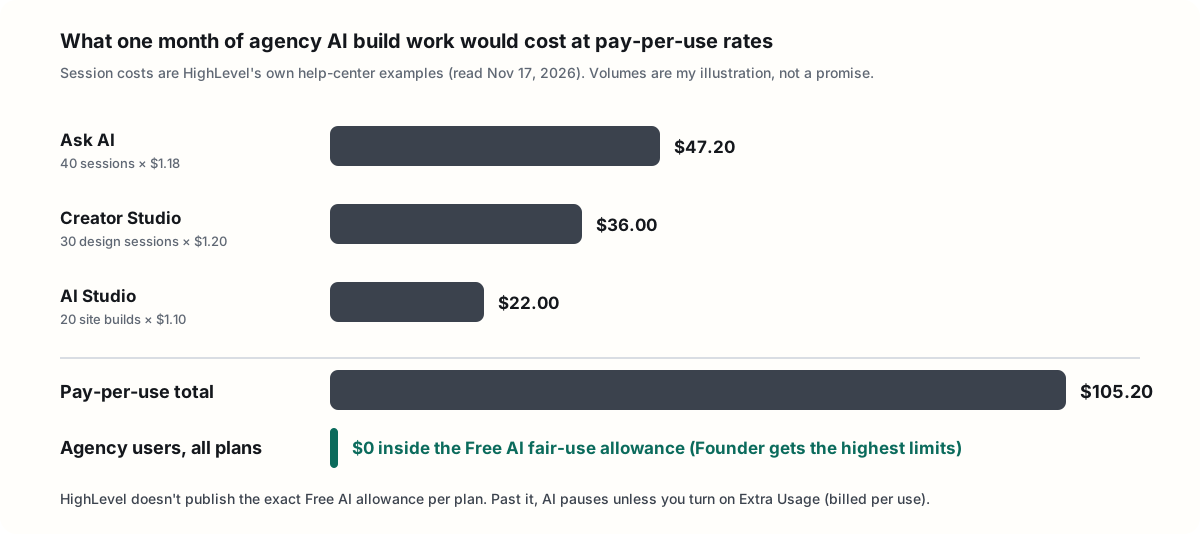
That’s my illustration, not a promise. Your sessions could cost more or less, and HighLevel doesn’t publish the exact allowance. But it shows why the free AI matters:
- It removes the meter while you build. You can try five versions of a landing page without wondering what each one costs. On pay-per-use, that hesitation is real.
- It used to cost money. Before LevelUp, Ask AI and AI Studio came with a $20-a-month agency AI Assistant plan. HighLevel retired that plan because the same tools are now free for agency users.
- Founder gets the most room. On its webinar, HighLevel said the $97 plan has the smallest allowance and the $297 a bigger one. Founder’s is the highest, so heavy builders are less likely to hit the wall mid-project.
- The best output is Founder-only for your team. Among agency plans, Ultra quality in Creator Studio is only on $497. Client sub-accounts can also get it through the Growth or Unlimited AI Employee plans.
The honest caveat: free AI alone doesn’t justify an extra $200 a month over Unlimited, because Unlimited gets free AI too, just with lower limits. It tips the math when you build for many clients, hit Unlimited’s limits, or want Ultra creative. Pair it with the $20 client tier or with markup, below, and the upgrade usually pays for itself.
How does the $20 AI Employee Starter plan work?
AI Employee Starter is a $20-a-month plan per client sub-account that only Founder agencies can offer. It gives the client’s own users included AI Studio, Ask AI and Creator Studio usage plus unlimited Content AI, all subject to fair use. It’s for clients who want to build with AI themselves. It doesn’t include Conversation AI or Voice AI.
Here’s how the three client AI plans compare, from HighLevel’s AI Product Pricing article on November 17, 2026:
| Included per sub-account | Starter $20/mo (Founder only) | Growth $50/mo | Unlimited $97/mo |
|---|---|---|---|
| Ask AI, AI Studio, Creator Studio | Usage included | 2x usage | 5x usage |
| Content AI | Unlimited* | Unlimited* | Unlimited* |
| Conversation AI | Pay per use | 1,000 responses/mo | Unlimited* |
| Voice AI | Pay per use | 100 min/mo | Unlimited* |
| Reviews AI | Pay per use | Unlimited* | Unlimited* |
| Managed Agents | Pay per use | 100 runs/mo | 1,000 runs/mo |
*Fair use applies. When an allowance runs out, usage pauses unless Extra Usage is on.
On its webinar, HighLevel described the $20 plan as the way to give clients the builder AI. Think of a client with one staff member who wants to build their own pages and posts. You can sell that client Starter, at your own price, instead of the $50 Growth plan they don’t need.
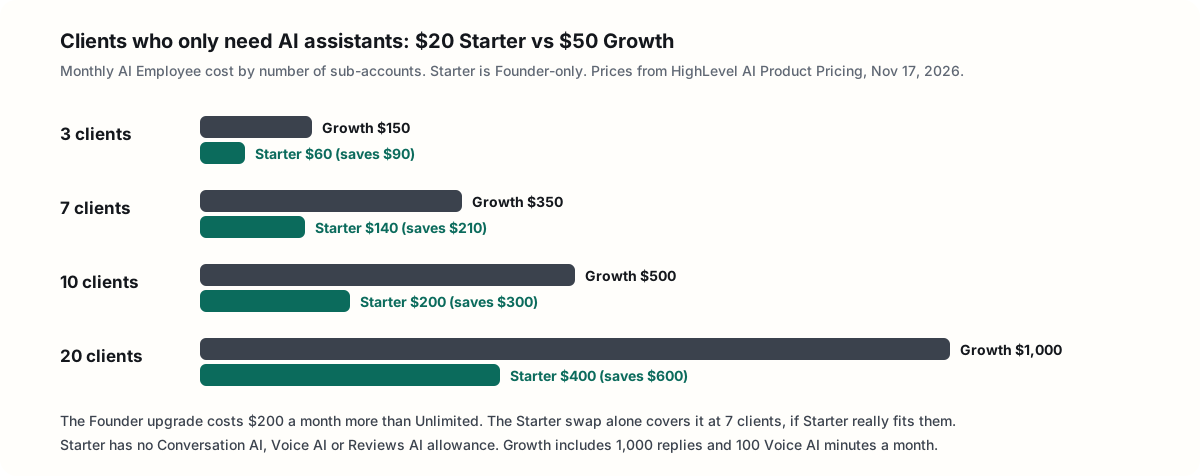
That’s where Founder can pay for itself quickly. If seven clients only need AI assistants, moving them from Growth to Starter cuts $210 a month, more than the $200 difference between Unlimited and Founder. Just be honest with yourself about whether Starter covers them. The moment a client needs chat or voice AI, Growth is the better fit.
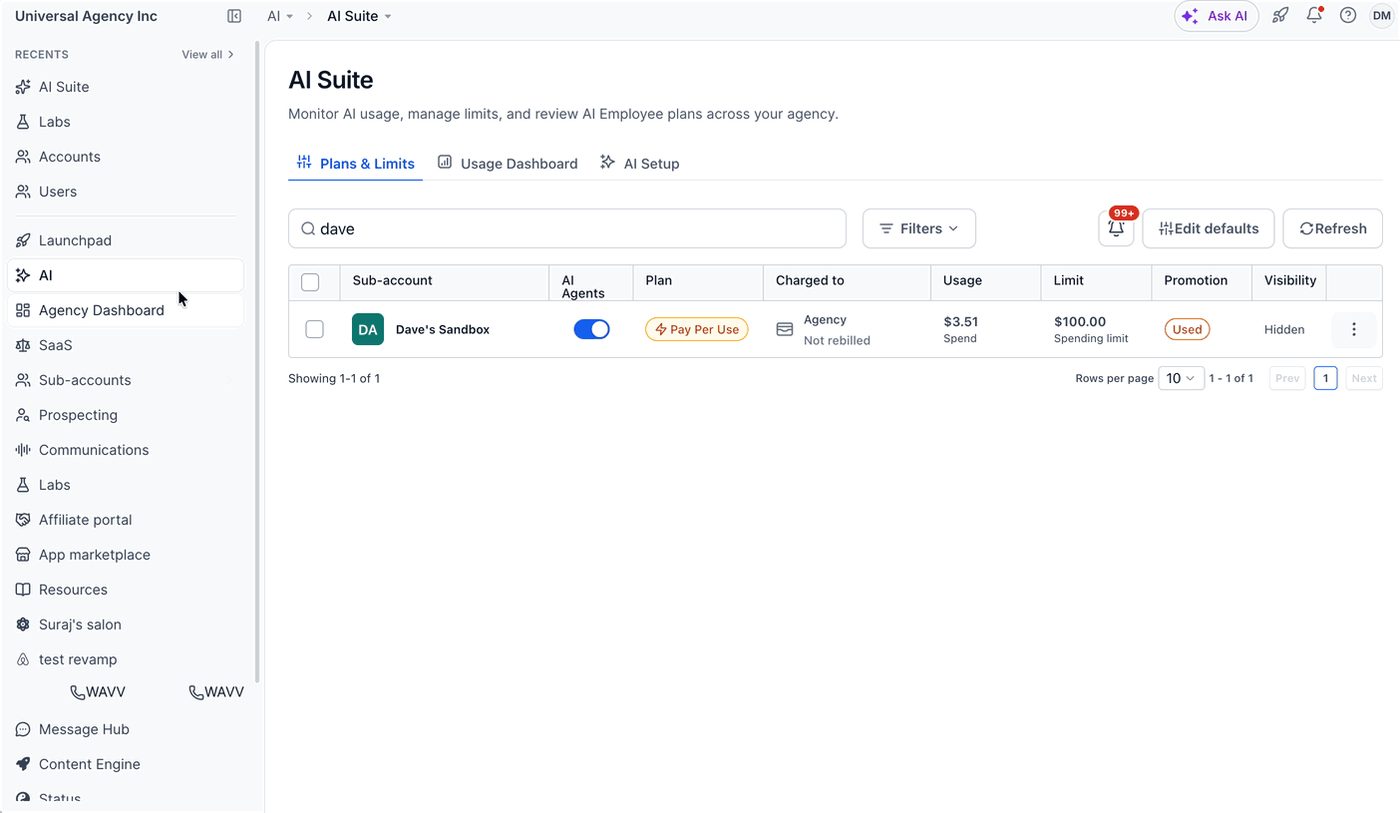
To move a client onto Starter, per HighLevel’s upgrade guide:
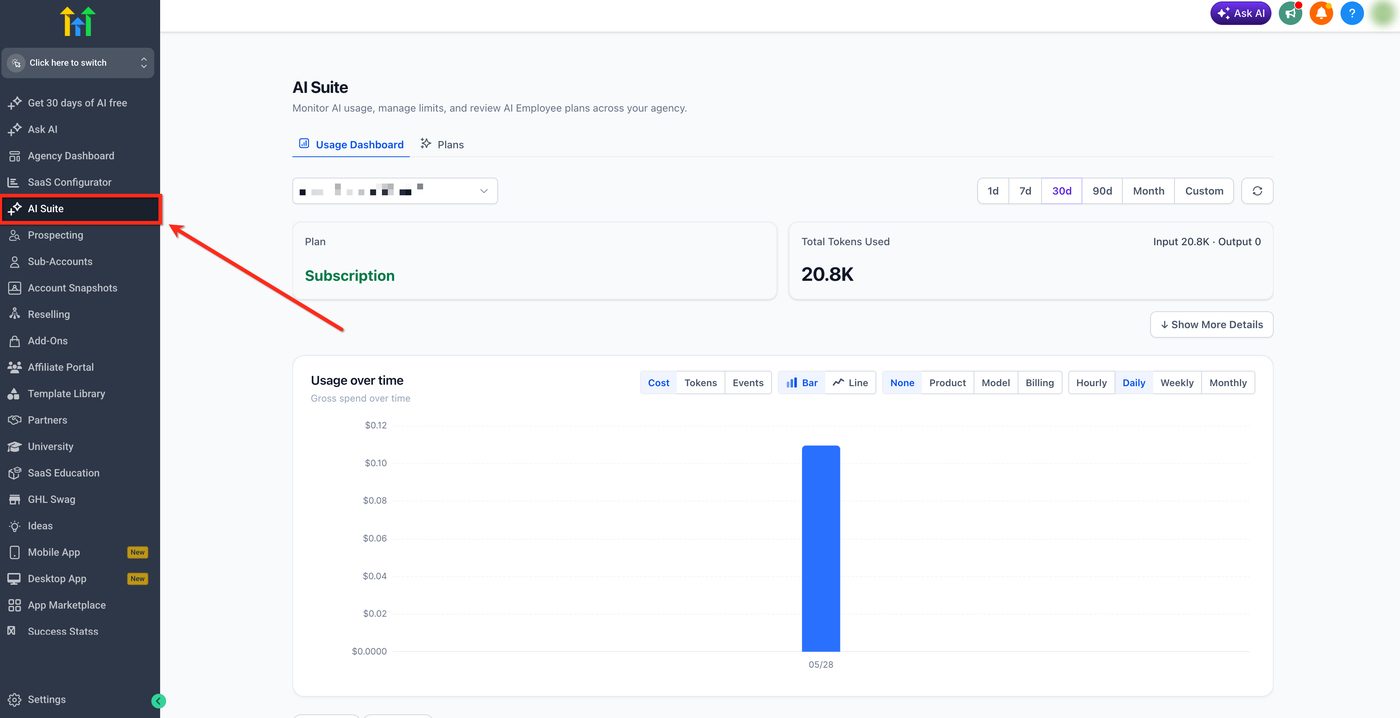
- Switch to Agency View and go to AI > AI Suite.
- Open the Plans & Limits tab.
- Find the sub-account, click the three-dot menu and choose Upgrade Plan.
- Click Continue with Starter, review the billing details and click Confirm & Upgrade.
For a deeper look at all three client AI plans and when pay-per-use is cheaper, see my AI Employee pricing breakdown.
How does the Founder plan compare with Starter and Unlimited?
Founder is everything in Unlimited plus SaaS mode, rebilling with markup, advanced API, the Founder-only tools, the most free AI and the $20 client AI tier. Unlimited ($297) gives you unlimited sub-accounts and rebilling at cost. Starter ($97) caps you at three sub-accounts. Here’s the full side-by-side as of November 17, 2026:
| Starter $97 | Unlimited $297 | Founder $497 | |
|---|---|---|---|
| Sub-accounts | 3 | Unlimited | Unlimited |
| Contacts and users | Unlimited | Unlimited | Unlimited |
| White-label desktop app | No | Yes | Yes |
| API access | Not listed | Basic | Advanced |
| Rebill usage at cost | No | Yes | Yes |
| Rebill with your markup | No | No | Yes |
| SaaS mode | No | No | Yes |
| Free AI for your team | Standard limits | Higher limits | Highest limits |
| Creator Studio quality (agency) | Standard, High | Standard, High | Standard, High, Ultra |
| $20 AI Employee Starter for clients | No | No | Yes |
| AI Employee rebilling | No | No | Yes |
| Meeting Rooms, Events, project management | No | No | Yes |
| HighLevel Industries, ticketing, loyalty | No | No | Yes (beta) |
| Partner Network eligibility | No | No | Yes |
| Founders Club and other perks | No | No | Yes (rolling out) |
Rows come from the pricing page, the Founder page, the pricing guide and the AI access comparison.
Founder vs Unlimited: is the extra $200 worth it?
The extra $200 a month is worth it when one of these is true:
- You want margin on usage. If your clients’ combined texting, calling, email and AI usage is $1,000 a month and you add a 20% markup, that’s $200 a month, which covers the upgrade.
- You have clients who only need AI assistants. The $20 Starter tier saves $30 per client compared with Growth. At seven clients, that’s $210.
- You want to sell software, not services. SaaS mode is Founder-only. My SaaS mode explainer covers how it works.
- You’d use the bundled tools. Meeting Rooms, Events, project management and ticketing could replace separate subscriptions you already pay for.
If none of those apply, Unlimited is the better deal. My Starter vs Unlimited guide helps with that first choice.
Founder vs Starter
Starter is for one business or up to three sub-accounts, with the smallest free AI window. Going from $97 to $497 is a $400-a-month jump. It only makes sense if you need SaaS mode or markup now. Most people starting out should begin on Starter or Unlimited and upgrade when there’s a reason.
Founder vs Enterprise
Enterprise is a custom-quoted plan above Founder. HighLevel’s pricing page lists a dedicated customer success manager, premium support, HIPAA compliance, the white-label mobile app and higher API limits by request. If you only need one of those, the pricing page add-ons sell several of them separately, such as HIPAA at $297 a month and the white-label mobile app at $497 a month.
How does rebilling with markup work on the Founder plan?
Rebilling with markup lets you charge clients more than HighLevel charges you for usage, and keep the difference. HighLevel bills your agency wallet first. Then the client’s account is charged your marked-up price. It works for phone, email, email validation, AI and more, and it’s only on the $497 plan.
From HighLevel’s pricing guide, checked November 17, 2026:
- Rebilling at cost is on the $297 Unlimited and $497 Founder plans.
- Rebilling with markup is only on the $497 Founder plan and is part of SaaS mode. You set the margin in Sub-Account Settings or the SaaS Configurator.
- Base rates you’d mark up include email at $0.675 per 1,000, email validation at $2.50 per 1,000, premium workflow actions at $0.01 per execution, and phone usage at Twilio’s rates.
The pricing page also says most add-ons “can be resold with your own markup” on the $497 plan:
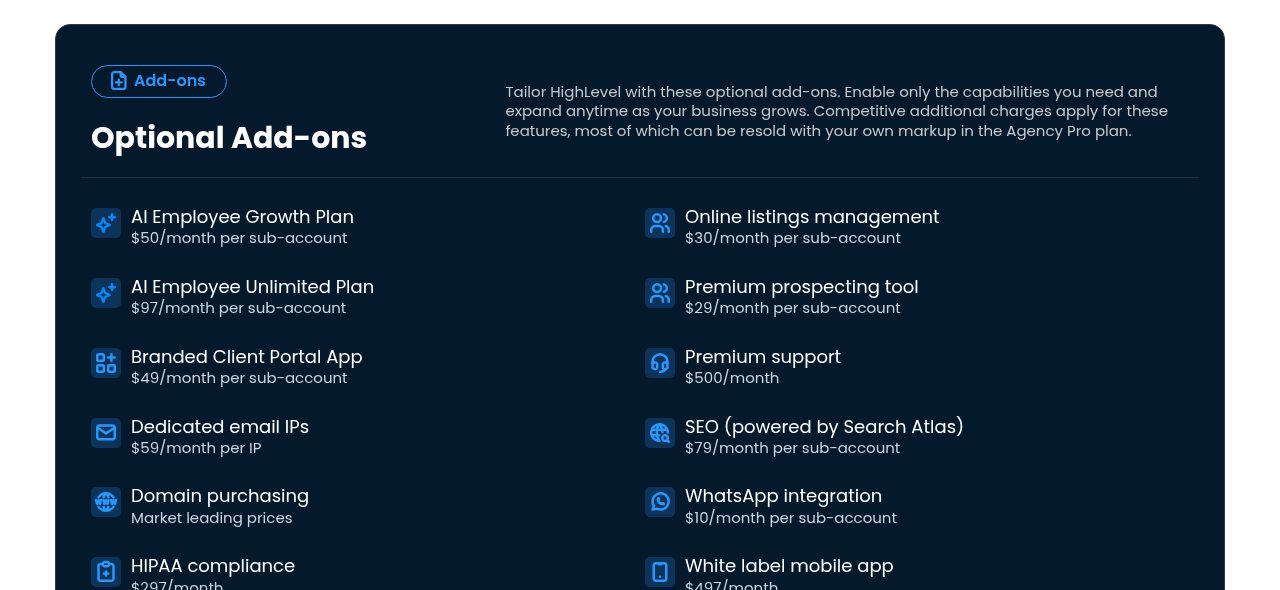
Markup isn’t free money. Your clients see what they pay, so price it like a service, not a hidden fee. My usage costs guide has the base rates, and my unexpected charges guide shows how to keep a client’s wallet from surprising them.
What perks come with the Founder plan?
Founder perks go beyond the software: the HighLevel Partner Network, AdFuel free local ads, commissions on client payments, the Founders Club community, a Founder support plan, discounted event tickets and headquarters meetups. As of November 17, 2026, most are scheduled for December 2026 through 2027 rather than live.
From HighLevel’s Founder page and launch post:
| Perk | What HighLevel says | ETA on the Founder page |
|---|---|---|
| Payment commissions | Eligible for recurring commissions on payments clients process through HighLevel’s native provider | Q1 |
| AdFuel | Eligible for free local ads promoting your business | Dec ‘26 |
| Founders Club | Online community with weekly live streams, masterminds and challenges | Dec ‘26 |
| HighLevel Partner Network | Get matched with businesses that need HighLevel help | Jan ‘27 |
| Founder Support Plan | Listed by name; HighLevel hasn’t published what it includes | Jan ‘27 |
| Headquarter hangouts | Meetups, trainings and hackathons in Dallas and Dubai | Jan ‘27 |
| Discounted event tickets | Special rates for HighLevel events, including LevelUp in Dallas | 2027 |
“Eligible” is doing a lot of work in that table. HighLevel hasn’t published commission rates, AdFuel budgets or qualification rules for those perks yet, so I wouldn’t upgrade for any of them alone.
How does the HighLevel Partner Network work?
The Partner Network matches businesses with qualified HighLevel experts, starting January 1, 2027. You need an active Founder plan, but joining is optional and has no separate fee. HighLevel’s Partner Network article lays out the qualification steps:
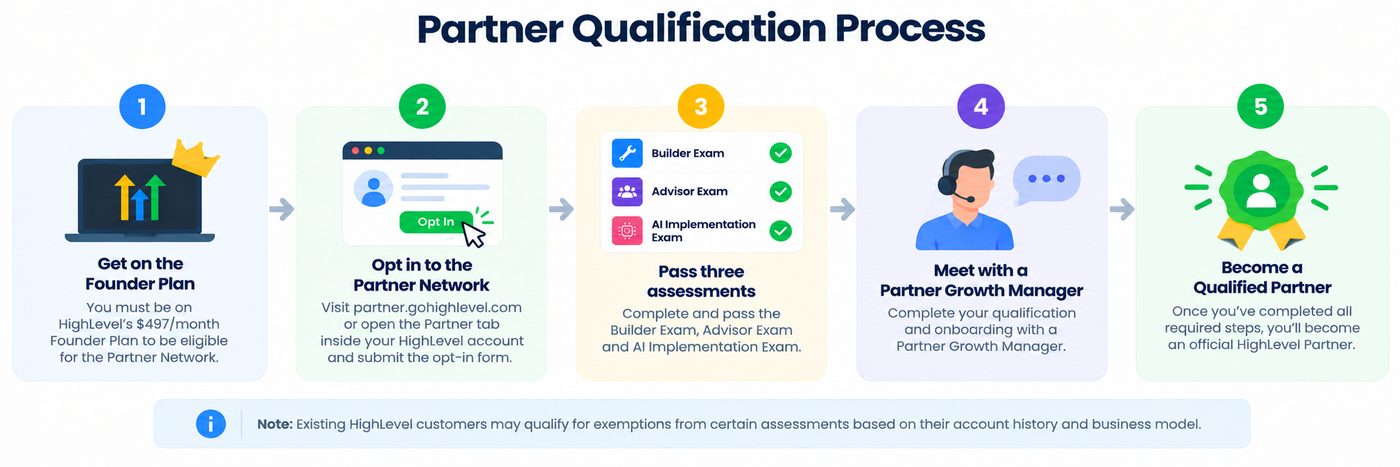
- Be on the Founder plan, then opt in at partners.gohighlevel.com or from the Partner tab in your account.
- Pass three assessments: the Builder Exam, Advisor Exam and AI Implementation Exam. HighLevel says some existing customers may qualify for exemptions, but Certified Admin status alone doesn’t qualify you automatically.
- Complete onboarding with a Partner Growth Specialist.
Each business gets five personalized Partner recommendations. Partners earn Bronze, Silver, Gold or Platinum status based on wallet-spend growth across their connected customer accounts, relative to other Partners. Higher status gets more weight in matching.
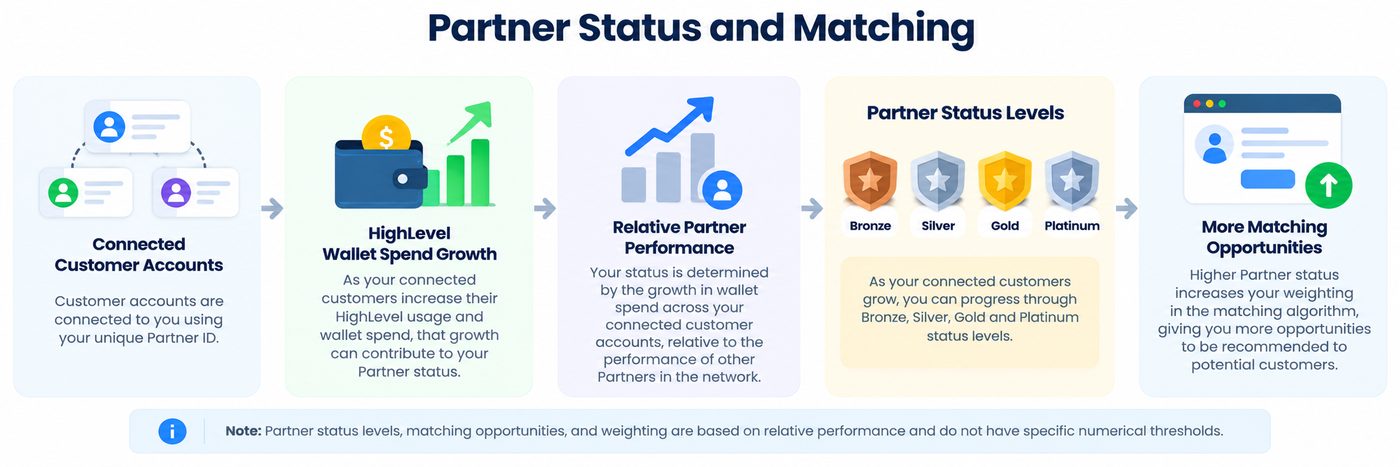
HighLevel is clear that being a Partner “does not guarantee a new client,” and neither do I. Treat it as a possible lead source, not a plan.
Which Founder features can you use today?
As of November 17, 2026, SaaS mode, rebilling with markup, the A2P Console and advanced API are live. Project management, Meeting Rooms, Events, Workflow Maps and custom navigation are in Labs. HighLevel Industries, ticketing and loyalty are in private beta. Custom Onboarding and the Email Health Console are coming soon.
On its webinar, HighLevel said existing $497 customers get the new features in stages, and some sit in Labs or private beta first. If you can’t find a feature, check Labs in your account. Private betas have sign-up links in the LevelUp Day post.
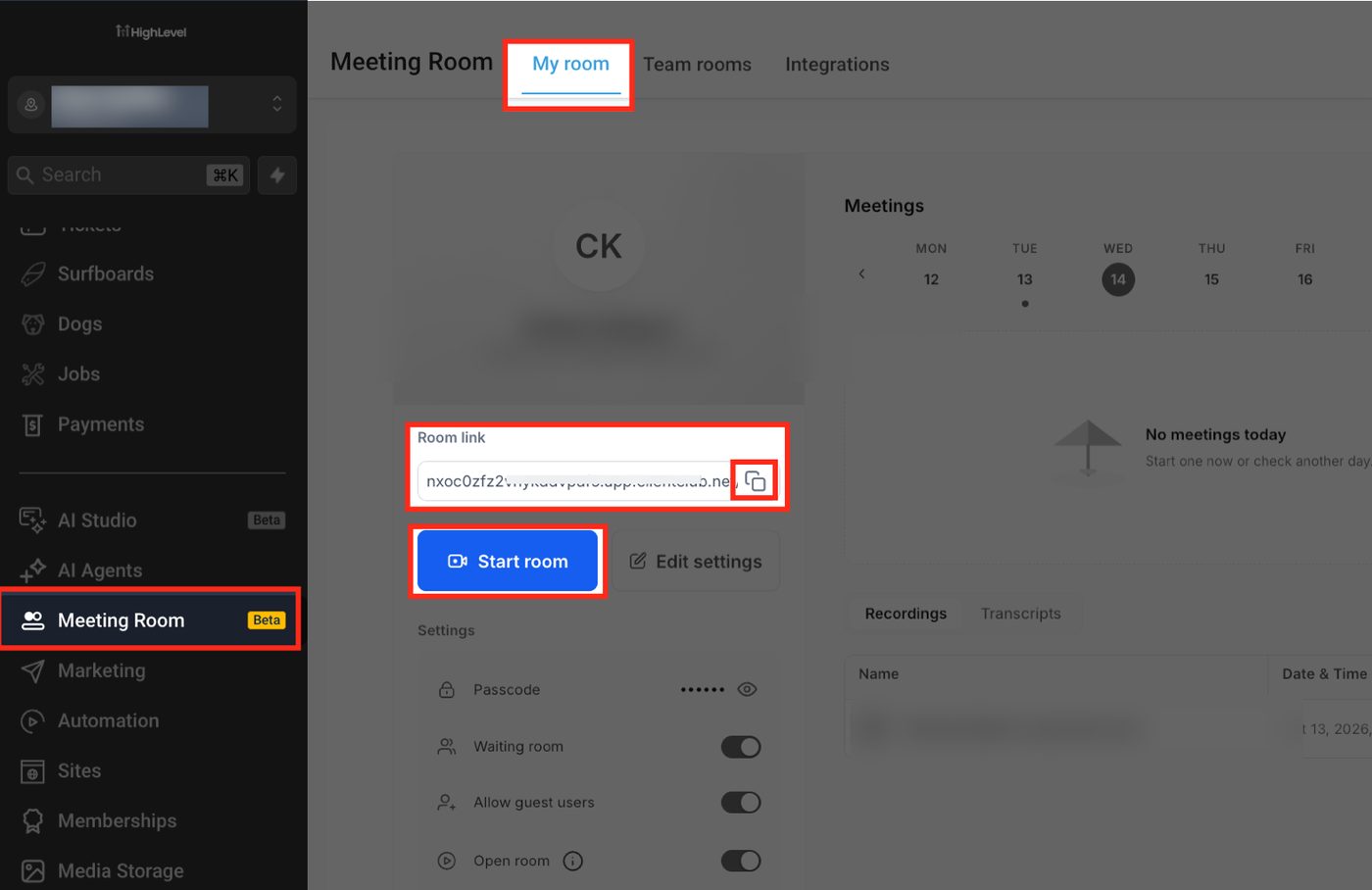
Meeting Room is a good example of what’s already usable. HighLevel’s Meeting Room overview says it’s “exclusive to Agencies subscribed to the Founder Plan ($497).” It includes:
- Permanent and per-appointment meeting links
- Guest access without a HighLevel login
- Waiting rooms and passcodes
- Recordings and speaker-labeled transcripts
- AI summaries with action items
- Live transcription in multiple languages
Check the HighLevel changelog before you upgrade for one specific feature. Things move from beta to general release quickly, and occasionally the other way.
How do I get the Founder plan, free trial or upgrade?
You can start a free trial on the Founder plan or upgrade an existing account from Billing. HighLevel’s standard trial is 14 days on any plan. Through my link, it’s 30 days. If you upgrade mid-month, HighLevel’s pricing page says you’re only charged the prorated difference.
New to HighLevel? Start the trial and pick Founder at signup. You get the whole Founder feature set and the Founder-level free AI during the trial, which is the best way to see whether you’d use it. My free trial guide walks through signup and what to set up first.
Already on Starter or Unlimited? Follow HighLevel’s upgrade steps from the Founder plan help article:
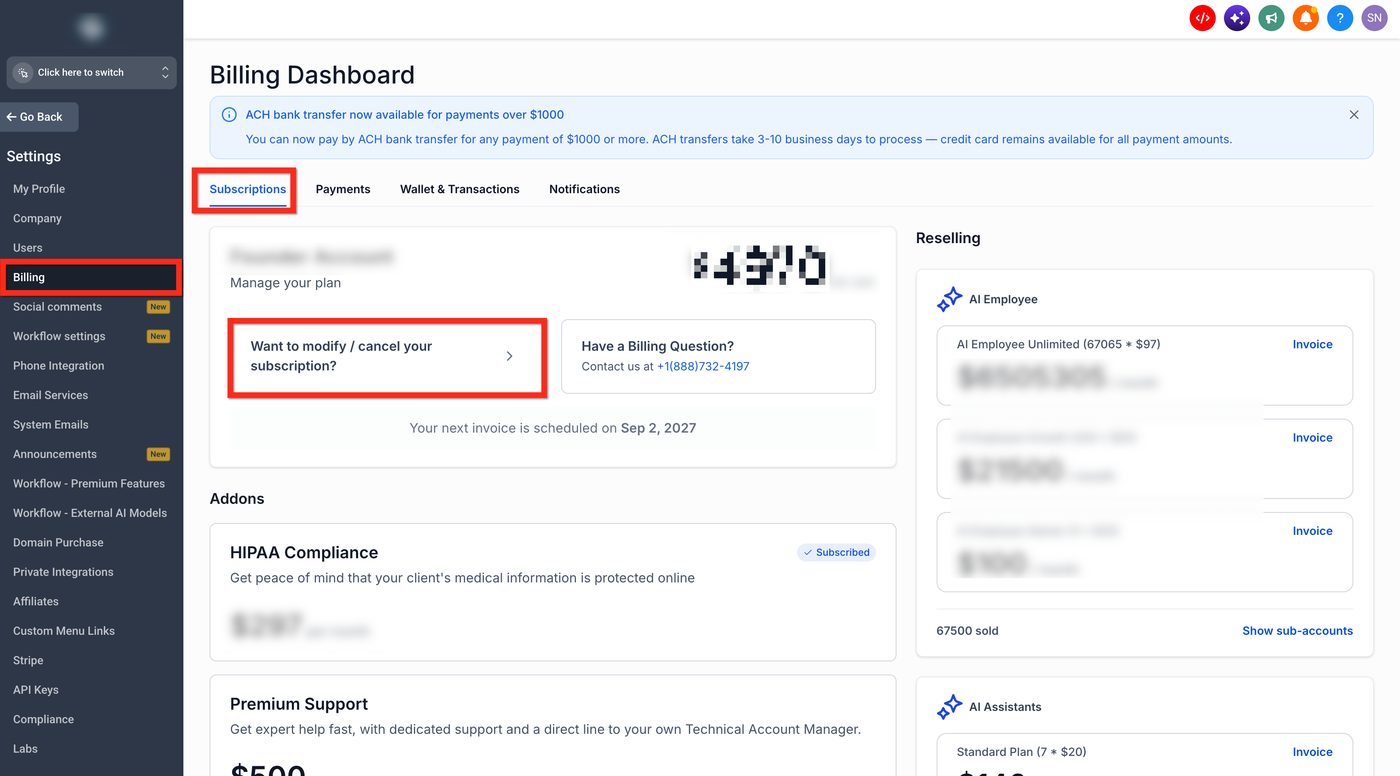
- In your agency account, click Settings, then Billing.
- Under Subscriptions, click Want to Modify/Cancel Subscription?
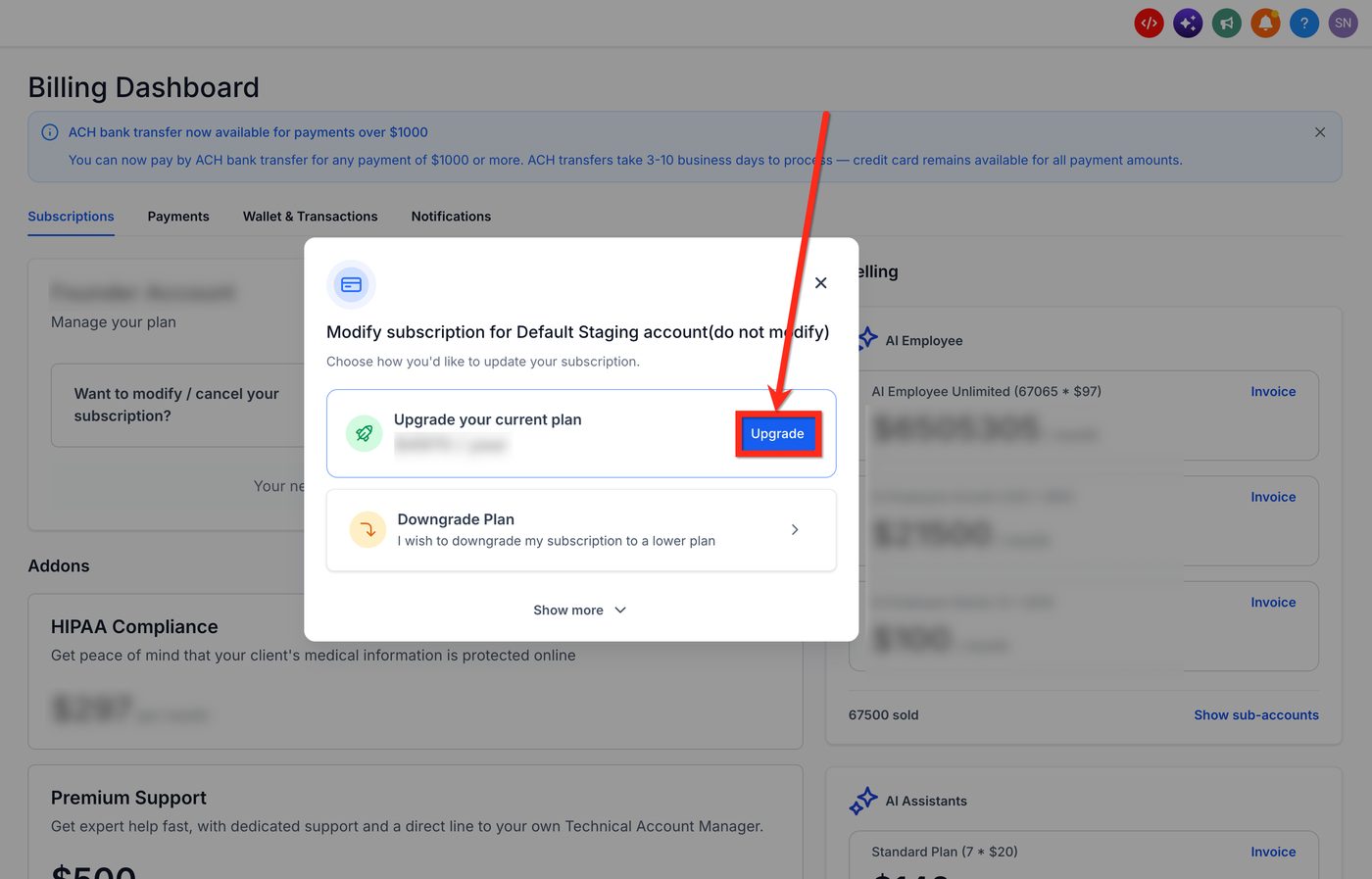
- Select Upgrade Your Plan.
- Choose Monthly or Annual billing.
- Select Founder and click Upgrade Now.
- Confirm the upgrade and pay. Your bank may send a payment confirmation email.
How do I turn on Founder features for a client?
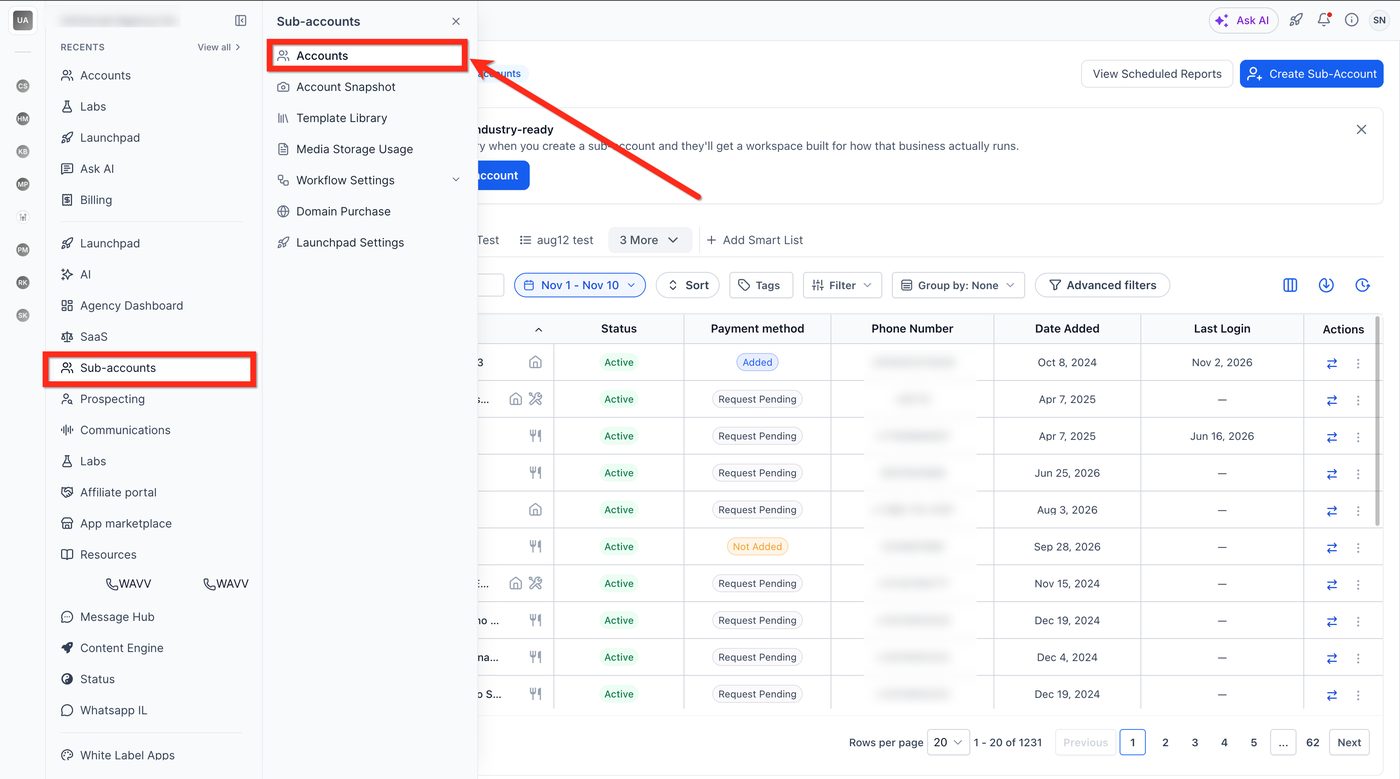
Founder-only features are switched on per sub-account. That’s why upgrading doesn’t make them appear everywhere. In the agency view, go to Sub-Accounts, then Accounts. Open the client, open Features and Limits, tick the feature and click Save. It takes about a minute per client.
The steps from HighLevel’s Founder plan help article:
- Go to Sub-Accounts > Accounts.
- Select the sub-account.
- Open the Features and Limits tab.
- Search for the Founder feature, for example Meeting Room, and tick the box.
- Click Save. Repeat for each sub-account that should have it.
Because it’s a per-client switch, you can sell Founder features as an upsell to the clients who want them.
What happens if I downgrade from the Founder plan?
If you downgrade from Founder, HighLevel says you lose access to the features exclusive to that plan. That means SaaS mode, rebilling with markup, Meeting Rooms, the $20 client AI tier and the rest. Your free AI limits drop to the lower plan’s level. Partner Network eligibility also needs an active Founder plan.
Before downgrading, check:
- Client billing. Any client on a SaaS plan or a marked-up rebilling setup needs a new arrangement first.
- Client AI plans. AI Employee Starter is only available to Founder agencies, so plan how those clients move to Growth or pay-per-use. HighLevel doesn’t spell out what happens to active Starter subscriptions on a downgrade. Ask support before you switch.
- Meeting links and events. Anything booked on Meeting Rooms or Events needs a replacement tool.
The pricing page FAQ confirms you “can also downgrade if your needs change.” There’s no long-term contract on monthly billing.
Who is the Founder plan for, and who should skip it?
The Founder plan is for agencies and consultants who serve several clients and will use at least one of these: markup on usage, SaaS mode, the $20 client AI tier, or the bundled tools. Skip it if you run one business, have only a couple of clients, or haven’t signed a paying client yet.
Good fit:
- Agencies with five or more clients who send texts, make calls or use AI each month
- Anyone selling HighLevel as their own software through SaaS mode
- Builders who use AI Studio and Creator Studio heavily and hit the limits on lower plans
- Teams that would replace a video meeting, events or project tool with the built-in one
Probably skip it:
- A single business using HighLevel for itself. Starter has the core features.
- A new agency with no clients yet. Start on Starter, then upgrade when you have a reason.
- Anyone upgrading only for perks that aren’t live yet
My take: the Founder plan is the strongest $497 plan HighLevel has offered. That’s not because of any one feature. It’s because the free AI, the $20 client tier and markup all reward the same thing: serving more clients from one account. If that’s your business, the trial is the cheapest way to prove it.
Frequently asked questions
What is the GoHighLevel Founder plan?
The HighLevel Founder plan is the new name for the $497-a-month Agency Pro plan, at the same price. As of November 2026 it includes everything in the $297 Unlimited plan plus SaaS mode, rebilling with your own markup, advanced API access, Founder-only tools such as Meeting Rooms, Events and project management, and the highest free AI limits.
How much does the HighLevel Founder plan cost per year?
The Founder plan is $497 a month. HighLevel's in-app upgrade screen, shown in its Founder plan help article on November 17, 2026, lists annual billing at $4,970 a year, about $414 a month. The public pricing page shows $2,970 under the Founder card, which appears swapped with Unlimited, so confirm the figure at checkout.
Is AI really free on the HighLevel Founder plan?
Partly. HighLevel's builder AI (Ask AI, AI Studio, Creator Studio and Content AI) is free for agency users on every plan, subject to fair use, and the $497 Founder plan gets the highest limits plus advanced models. AI that runs a client's business, such as Conversation AI, Voice AI, Reviews AI and Managed Agents, is still paid, as of November 2026.
Can I resell HighLevel's free AI to my clients?
No. HighLevel's Free AI for Agency Users article says Free AI can't be resold, transferred or shared with sub-account users. On the Founder plan you can instead sell clients an AI Employee plan (Starter at $20, Growth at $50 or Unlimited at $97 a month per sub-account, as of November 2026) at your own price, or rebill pay-per-use AI with a markup.
What is the $20 AI Employee Starter plan?
AI Employee Starter is a $20-a-month plan per sub-account that only agencies on the $497 Founder plan can offer, as of November 2026. It gives a client's own users included usage of Ask AI, AI Studio and Creator Studio and unlimited Content AI under fair use, but no Conversation AI, Voice AI or Reviews AI allowance; those are billed per use.
Is the HighLevel Founder plan the same as Agency Pro or SaaS Pro?
Yes. HighLevel's help center calls the Founder plan the new name for the $497 Agency Pro plan, which many people also called the SaaS Pro plan. Existing $497 customers were moved over automatically with no action needed, and new Founder features roll out to them in stages.
Can I try the HighLevel Founder plan for free?
Yes. HighLevel's pricing page offers a 14-day free trial on any plan, including Founder, as of November 2026. Some partner links, including the one on SubAccount HQ, give 30 days instead. A card is required at signup and billing starts when the trial ends unless you cancel.
What happens if I downgrade from the Founder plan?
HighLevel's Founder plan help article says that if you downgrade, you lose access to features exclusive to the Founder plan, such as Meeting Rooms, SaaS mode and rebilling with markup. HighLevel's pricing page FAQ says you can downgrade if your needs change, and upgrades mid-month are charged only the prorated difference.
Do I need the Founder plan to join the HighLevel Partner Network?
Yes. HighLevel says an active Founder plan is required, joining is optional and has no separate membership fee, and you must pass the Builder, Advisor and AI Implementation exams and complete onboarding. Partner matching with businesses is scheduled to start January 1, 2027, and HighLevel says it doesn't guarantee clients.
Sources I checked
- Help center: Introducing the HighLevel Founder Plan (features, upgrade steps, FAQ)(checked Nov 17, 2026)
- Help center: Email Re-Billing on the Unlimited $297/$2970 and Founder $497/$4970 plans(checked Nov 17, 2026)
- HighLevel blog: Meet the HighLevel Founder plan (Nov 7, 2026)(checked Nov 17, 2026)
- HighLevel Founder plan page (founder.gohighlevel.com)(checked Nov 17, 2026)
- HighLevel pricing page (plan cards, add-ons, FAQ)(checked Nov 17, 2026)
- Help center: Free AI for Agency Users(checked Nov 17, 2026)
- Help center: Comparing AI Access Across HighLevel Plans(checked Nov 17, 2026)
- Help center: AI Product Pricing(checked Nov 17, 2026)
- Help center: Ask AI Sessions Pricing Overview(checked Nov 17, 2026)
- Help center: AI Studio – Pricing(checked Nov 17, 2026)
- Help center: Creator Studio – Pricing(checked Nov 17, 2026)
- Help center: How to Upgrade a Sub-Account to the $20 AI Employee Starter Plan(checked Nov 17, 2026)
- Help center: Retirement of the $20 AI Assistant Plan(checked Nov 17, 2026)
- Help center: HighLevel Pricing Guide (rebilling, wallet, add-ons)(checked Nov 17, 2026)
- Help center: What is the HighLevel Partner Network?(checked Nov 17, 2026)
- Help center: Meeting Room in HighLevel – Overview(checked Nov 17, 2026)
- HighLevel blog: LevelUp Day 2026 feature roundup(checked Nov 17, 2026)
- HighLevel on YouTube: LevelUp FAQ Webinar (Nov 5, 2026)(checked Nov 17, 2026)
- YouTube: The New HighLevel Founder Plan Explained (Don't Buy Yet)(checked Nov 17, 2026)
- HighLevel changelog(checked Nov 17, 2026)

Written by Austin Armstrong
I'm a founder, speaker and AI educator. Here I break down how HighLevel actually works: what it costs, how the setup goes, and when a different tool makes more sense. Every guide is checked against HighLevel's own help docs and live pricing pages, and the sources are listed at the bottom.
Last updated · Fact-checked against HighLevel's help docs on Nov 17, 2026